Edit Microsoft Office files in Browser
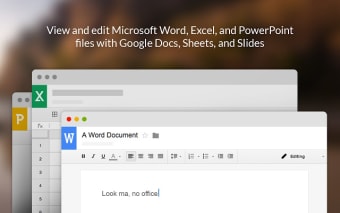
Office Editing for Docs, Sheets & Slides is a free browser extension that lets users open and edit Microsoft Word, Excel, and PowerPoint files directly in Google Docs, Sheets, and Slides. It eliminates the need to install desktop office software when performing basic document, spreadsheet, or presentation editing tasks online today.
Top Recommended Alternative

Office Editing for Docs, Sheets & Slides converts Microsoft Office file formats into Google native formats while preserving most layout and formatting. The software suits users who regularly receive Office documents but prefer creating, reviewing, and collaborating on files inside the Google Workspace environment for convenience and streamlined cloud-based workflows.
Convenient editing for Office files
Office Editing for Docs, Sheets & Slides supports common Office formats such as DOCX, XLSX, and PPTX, allowing users to view, edit, and comment on files directly from their browser. The software integrates with Google Drive for automatic opening. However, it offers limited support for advanced Office features, making it less reliable for complex documents, detailed formatting, or professional-level workflows.
The software focuses on basic and intermediate editing features, including text formatting, formulas, charts, and slide layouts. It maintains most original formatting, but formatting issues with complex files are common. Advanced macros, complex formulas, and custom fonts may not transfer correctly. The software also requires internet access, limiting usability in offline environments. Performance varies depending on file size and document complexity.
Alternatives include Microsoft Office Online, LibreOffice, and Zoho Office Suite, each offering different levels of compatibility, functionality, and file support. Microsoft Office Online provides stronger native Office compatibility, while LibreOffice offers offline desktop editing. Zoho Office Suite focuses on cloud collaboration. Compared to full desktop software, this extension remains more limited but works for quick edits, collaboration, and basic document reviews in a browser-based workflow.
Reliable tool for everyday editing
Office Editing for Docs, Sheets & Slides is a practical and convenient solution for users who rely on Google Workspace but frequently need to handle Microsoft Office files. It provides easy access without extra installations and supports seamless cloud collaboration. While it does not replace full-featured desktop software, it performs reliably for everyday editing, reviewing, and basic document management tasks across multiple file types.























.png)